Know who’s warming up. The follow-up is already written.
Your contacts, your leads and what each person is reading, in one place. Every lead gets the right next article in your name. When someone starts reading, you’ll know it’s time to call.
Included in Pro, $79/mo.
Hi Jordan, this one answers the question you asked last week.
Read "How much do you really need for a down payment?"
From the email sent Tuesday.
Thursday: two articles on closing costs
Matched to what Jordan read.
Call Jordan
Three reads this week. A good time to reach out.
Example with demo data. The client's inbox, then your phone.
Where your leads come from
They arrive on their own, with where they came from and what they wanted.
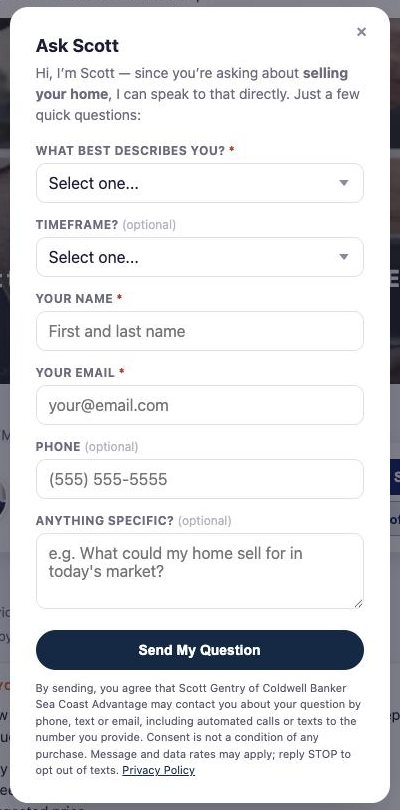
A reader asks you a question.
The Ask button on every article you share. Their question, timeframe and contact details land in your Contacts.
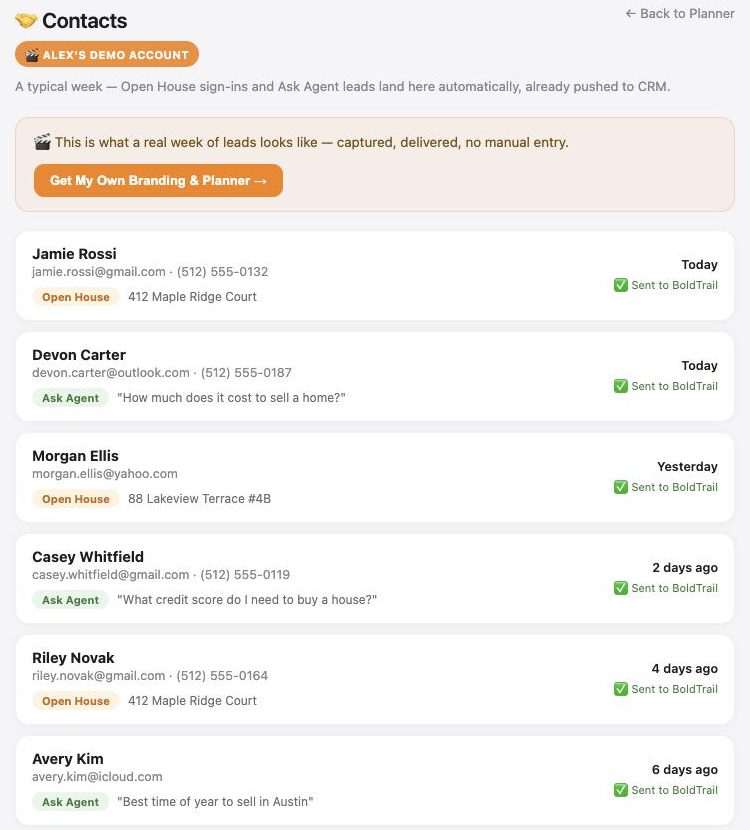
Guide downloads and open house sign-ins.
Free guides carry your name, and everyone who downloads one appears on your Guide Downloads list. Every open house visitor who signs in lands in your Contacts.
Jordan Ellis
Buying · Southport · 1–3 months
Call Jordan today
Read 3 articles on down payments this week, from your emails.
- TodayRead "How much do you really need for a down payment?"
- TueEmail sent with 3 articles
Import your sphere and past clients.
Bring them in from a spreadsheet, or add them one at a time. Past clients hear from you four times a year.
Follow-up that runs itself
The months between someone showing interest and being ready to talk are where leads go cold. Studio4Agents keeps them warm in the background.
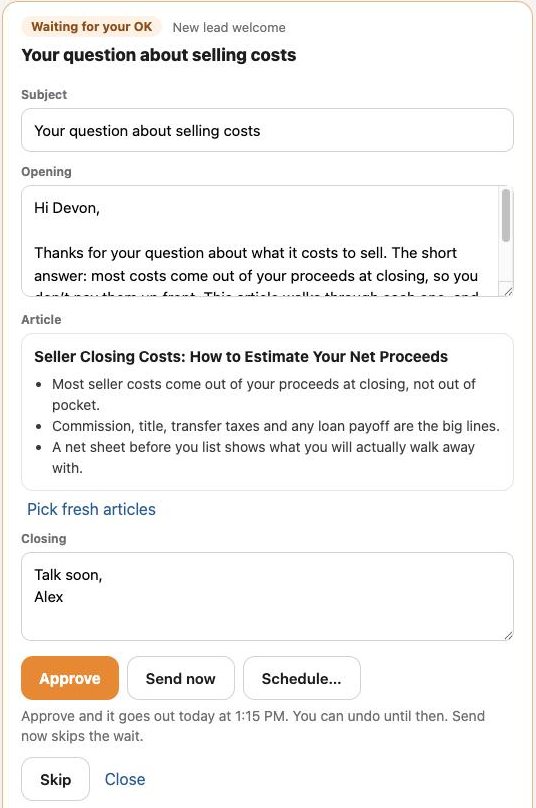
A welcome email in your name.
With an article that answers what they asked, summarized in three points. It waits for your OK by default.
- Approve, send now or schedule
- Five minutes to undo after you send
- Let the kinds of email you trust send on their own
- Day 1Welcome email in your nameThree articles on what Jordan asked about
- Day 7A call reminder for youSet automatically after the email goes out
- NextFollow-up with new articlesNever one Jordan has already read
- PausedYou talked on the phoneEmails wait a week, then pick back up
New articles, matched to what they read.
Follow-ups keep going with articles that fit each person, plus a call reminder for you. Nobody gets the same article twice.
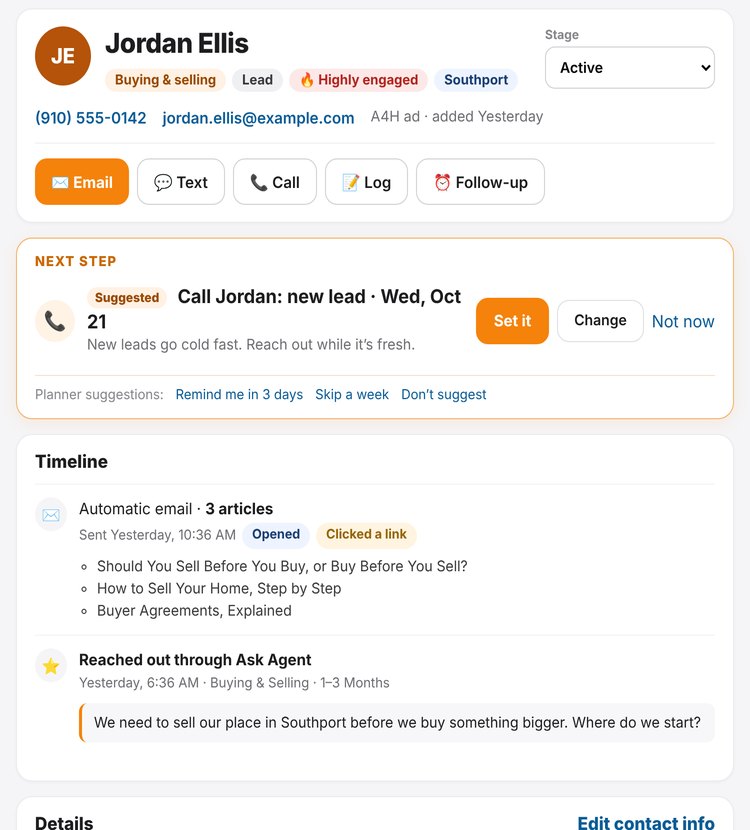
They move to the top of your list.
When someone reads, clicks or asks a question, their contact page shows why, with a next step you can set in one tap.
You see what they read, not just that they clicked.
Most marketing stops at the post. Studio4Agents follows the link. When someone you reached by email, text or a tracked link reads your articles, guides or listings, their contact page shows what they’re interested in, how strongly, and whether it’s growing.
Names appear only for people you reached by email, text or a tracked link, or who told you who they are through Ask or a guide. Posts on social media show counts, not names. People are never identified by their network address or device. A read is interest, not a decision to buy or sell.
- Likes, comments, views and reach inside Facebook, Instagram, LinkedIn and other networks.
- Who clicked from a social post. Those are counts only.
- Email opens are a weak signal: some email apps open every message automatically. Reads and clicks count for more.
- A forwarded link can credit the person who forwarded it.
See it from your client’s side.
Open an email from our demo agent, read the article, then switch sides and see the follow-up your reading lined up. Nothing is sent or saved.
Or just ask your AI
With Pro, connect ChatGPT, Claude or Gemini and ask in your own words.
Polite without you watching
Questions
Does it send emails without me?
Not unless you choose that. Every email waits for your OK by default, with five minutes to undo after you send. You can let a type of email you trust send on its own, or pause all automated email at any time.
How does it know what someone is reading?
When a contact opens a link you sent them by email or text, or tells you who they are through Ask or a guide, their later visits to Advice4Homeownership count toward their interests. It never identifies people by their network address or device, and it honors the Global Privacy Control browser setting.
Do my contacts know?
Reading activity is explained in our privacy policy and on Advice4Homeownership. Follow-up emails never mention what someone read.
Do I have to stop using my current CRM?
No. Many agents keep their CRM for active clients and use Studio4Agents for early-stage follow-up. New leads can be sent to your CRM, and you can import your contacts from a spreadsheet.
Can it replace my CRM?
For many agents, yes: contacts, next steps, reminders, follow-up emails and history are all here. If you rely on deal pipelines, transaction tracking or a power dialer, keep your CRM for those.
Does it include my social media analytics?
No. It counts visits to Advice4Homeownership and Studio4Agents pages from your shared links, emails and texts. Likes, comments and reach inside social networks are not included.
Know who to call, and why.
Pro includes the Planner, branded content, listings, open houses, follow-up, every video studio and your AI connection.